

If someone is reading your WhatsApp messages without your permission, the first place I’d look isn’t some mysterious “spy code.” It is Linked Devices.
WhatsApp already gives you a way to see where your account is connected. From there, you can investigate unfamiliar applications, review suspicious behavior and strengthen the account so that a compromised session is harder to repeat.
The important distinction is that a strange symptom isn’t automatically evidence of spying. A hot phone, poor battery life or an unread message changing status can have several explanations. What matters is finding something concrete that you don’t recognize.
Start with WhatsApp’s Linked Devices screen
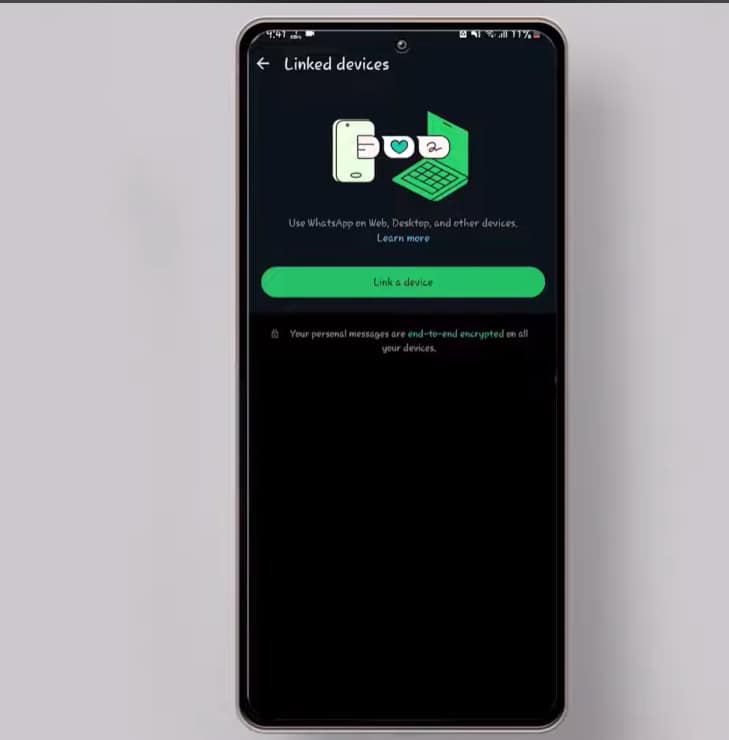
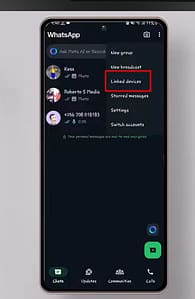
Open WhatsApp and, on Android, tap the three-dot menu in the upper-right corner.
Select Linked devices.
This is the section where WhatsApp shows devices currently linked to your account, such as computers using WhatsApp Web or desktop applications.
Caption: Open the WhatsApp menu to access your linked devices.
Check every active session
Look carefully at the devices listed.
A Windows computer, Chrome browser or another device isn’t suspicious simply because you don’t recognize the name immediately. You might have linked it yourself weeks or months ago and forgotten about it.
The stronger warning sign is a device that you know you never connected.
If you find one, open the session and select Log out.
This immediately removes that linked-device session from your WhatsApp account.
Caption: Remove any linked device you don’t recognize.
This is arguably the most useful check in the entire guide because it gives you something concrete to investigate rather than relying on symptoms.
An unknown app deserves investigation — not an automatic deletion
The next step goes beyond WhatsApp.
Open your phone’s Settings and go to Apps or Applications. The exact menu name depends on whether you’re using Android, Samsung One UI or another interface.
Review the applications installed on the device.
Look for apps you don’t remember installing, particularly software with a vague name or an application that doesn’t appear to have an obvious purpose.
But don’t make the mistake of assuming that every unfamiliar app is spyware.
Some applications are installed by the phone manufacturer, mobile carrier or another legitimate service. Others may have been installed months ago and simply forgotten.
If you find something suspicious, first check its name and developer. If you confirm that it isn’t needed and shouldn’t be there, you can uninstall it.

Caption: Review installed applications and investigate anything you don’t recognize.
These symptoms are clues, not proof
Several signs are commonly associated with claims of WhatsApp surveillance:
Messages appearing as read
If a message suddenly shows as read even though you didn’t open it, investigate.
However, this alone doesn’t prove that someone has access to your account. Another linked device, an accidental interaction or other account activity could explain what happened.
Unusual heat or battery drain
A phone that suddenly becomes hot or loses battery much faster than normal can justify an investigation.
But this is one of the weakest indicators by itself. A system update, demanding application, poor network coverage, high screen brightness or an aging battery can produce exactly the same symptoms.
Unexpected messages or links
Be especially careful with messages containing strange links, files or requests to install software.
The danger here may not be someone already spying on your WhatsApp. It could instead be an attempt to trick you into giving an attacker access.
That distinction matters.
Turn on WhatsApp’s two-step verification
After checking the account, strengthen it.
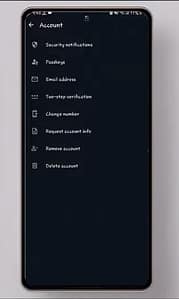
Open WhatsApp’s account settings and enable two-step verification. You’ll create a PIN that adds another layer of protection when your WhatsApp account is registered on a new device.
This is one of the measures I’d prioritize because it addresses the account itself rather than trying to detect spyware after the fact.
If WhatsApp offers an email recovery option during the setup, use an email account that you control and protect properly.
The goal is simple: even if someone manages to obtain your phone number or attempts to register your account elsewhere, there is another security barrier to overcome.
Don’t ignore the physical phone
There’s another attack route that software-focused guides often overlook: physical access.
If somebody can regularly access your unlocked phone, they may be able to change settings, link a computer or install software without needing sophisticated hacking tools.
That makes your screen lock surprisingly important.
Use a strong device passcode, keep the phone under your control and avoid leaving an unlocked device unattended.
For shared computers, always remember to log out of WhatsApp Web when you’re finished. This is particularly important on public computers, workplace machines or devices used by several people.
Avoid unofficial app sources
On Android, avoid downloading applications from random websites simply because an APK promises an extra WhatsApp feature, tracking capability or some other modification.
Stick to reputable sources such as Google Play.
On iPhone, use the App Store and avoid instructions that ask you to install questionable configuration profiles or unofficial software.
This isn’t about assuming every third-party application is malicious. It’s about reducing the number of places from which untrusted software can reach your phone.
What I’d check first if I suspected someone had access
I wouldn’t spend an hour looking for exotic signs.
I’d do these five things, in this order:
- Open WhatsApp → Linked devices and remove anything I don’t recognize.
- Review installed applications and investigate unfamiliar software.
- Check account security and enable two-step verification.
- Look for unexpected behavior rather than treating battery drain alone as proof.
- Secure the phone physically with a strong passcode and avoid unofficial apps.
That sequence is more useful than the typical internet advice that treats every warm phone or battery drop as evidence of spyware.


